Nov 8, 2013

10 Best Offline Game Apps In Chrome

There hundreds of games available in Chrome webstore, here I listed 10 best chrome offline game apps. These 10 apps runs in a offline mode, so users can play gamecos without internet.


1. Angry Birds for Chrome is one of the most popular game currently having 10,000,000+ users. Smash, bash and pop your way through more than 400 unique Angry Birds levels.


Web Store - Angry Birds


2. Ooki Cookie
Do you like cookies? Then try "OokiCookie"! A colorful "avoider" game. Do not get caught by the hungry but very cute bushes. 20 exciting levels are waiting for you.


Web Store - Ooki Cookie

3. Offline Solitaire
Classic "Klondike" Solitaire as known and loved by computer users worldwide. Fast, clean and simple. No ads, no options, just straight into the game.


Web Store - Offline Solitaire

4. Fishing Joy
Over 100 Million mobile downloads and counting! FishingJoy is now available on Chrome in HTML5 for FREE!  And works without internet connection. The game features stunning deep-sea graphics, music, sound fx’s brought to you by Cocos2d-html5.


Web Store-Fishing Joy

5.Maze Manor Free
This is a game where you must navigate mazes to find treasure before you run out of time!


Web Store - Maze Manor Free

6. Pick Up Sticks
A very simple but addicting puzzle/skill game based on the popular kids game in which you have to pick up all sticks from the pile as fast as you can. Written in HTML5 this game can be played on your mobile or on your desktops.


Web Store - Pick up sticks

7. Games Pack 
This app includes 10+ Offline games such as Formula Driver, Papper Cannon XP, Bubble Shooter, Apple Shooter, Chess Game, Learn to Fly, Mario World, Tetris, Isoball 3, Sports Head Football, Billiard, Doom and Sami's Nail Studio.


Web Store - Games Pack

8. Canvas Life
Canvas Life is a canvas-based game inspired by Conway's Game of Life. Nice graphics based on Canvas/JS without flash and other plugins.

Web Store - Canvas Life

9. Mobialia Chess 3D
Best app for chess lovers, it has  Clean, simple and intuitive interface and users can move by dragging and dropping the piece with useful guide lines.


Web Store - Mobialia Chess 3D

10. Reversi
Reversi is a board game played by two players on a board with 8 rows and 8 columns. Jump over other color pieces to turn them into your color. The objective is to have more pieces than your opponent when no more moves can be played.
Web Store - Reversi

Chrome for Android version 28.0

The Chrome beta for Android updated to version 28.0.1500.31. The new version not having many new features but it comes with various stability improvements and bug fixes.


Recently Chrome beta 28.0 released for Desktop users with richer app notification with a revamped user interface.  "We’ve designed these notifications to be beautiful, useful and engaging. They can display formatted text and images, and can include actions directly inside the pop-up (so you can respond to that email right away)."

Click on this link to download Chrome beta for Android, keep in mind you cannot find it Google Play search bar.

How to Show your Website or Blog URL on Pinterest

Every bloggers and webmasters depends social network sites including Pineteres to get the traffic. Verify website is an useful feature for all site owners to get traffic from Pinterest. After you have verified your site with Pinterest, your site URL will be shown on the profile page, Search engines and every pins which you have pinned.  If you want to show your website on Pinterest first you have to verify your website URL manually.

How to:
  • Sign in to your Pinterest account
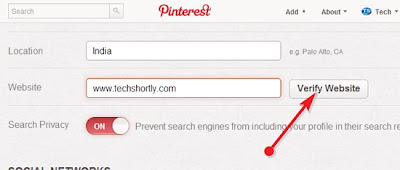
  • Go to Settings page,
  • Then scroll to website column, enter your site URL
  • Click on the Verify website button.
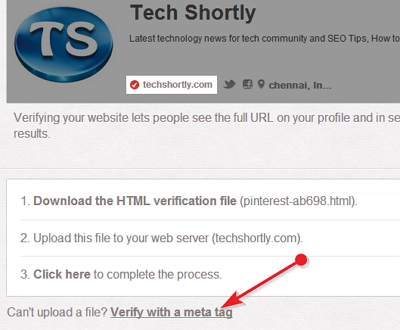
  • There are two ways to verify your website 
1) Download the HTML file then upload it your web server. Blogger blogs does not have this option so we continue with another(general) option.
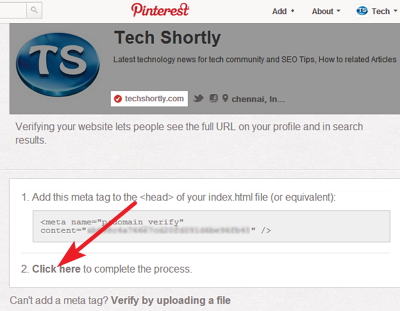
2) Click on the Verify with a Meta Tag link, copy the HTML code and paste it your template next to <head> then save your template.  


Finally click on the Click Here link to complete the process. 


Then close the window and see your Pinterest Profile page your site URL will be shown there. 

Note: Pinterest supports Top-level domains such as .com, and also one more option available to verify your website by filling this form

Now you can send Money to your friends from Gmail

Google announced during I/O event, it brings Google Wallet into Gmail. Now you can send money to your friends directly in Gmail, even if your friends don't have a Google Account. This feature only available Gmail desktop version not for mobile platforms.

With Google wallet from Gmail you can send money from your bank account without any service charges. If you have send money from your linked credit and debit cards, you have to pay flat fee of 2.9% for every transaction.


How to send money from Gmail:

This feature rolling out over the coming months to all U.S. Gmail users over 18 years old. Once this feature enabled to your account
  • Click on new Attach money $ icon, which is placed next to Drive in new compose window
  • Enter your amount, and hit send button. 


If you send money from your bank account it takes 10 working days to complete your process.  Sending money using your credit or debit card it instantly credited to your friend account.

How to solve image background color in Blogger

Recent days every blogspot users who has connected their Google+ account to Blogger.com facing new problem, when uploading new image on Blogger.  For example when users upload a new photo on blogger with white background that white background image will be automatically changed to grey background. And also Auto enhancement feature makes adjustments to brightness, saturation, contrast and more.

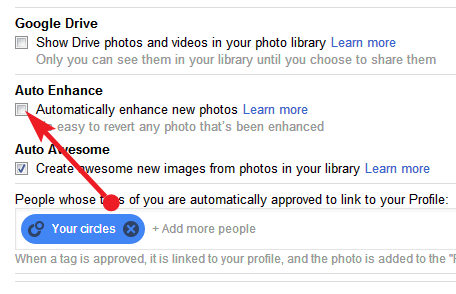
To avoid these changes you have to disable Auto Enhancement feature on your Google+ account. See below for step by step guide to disable Auto Enhancement feature

How to disable Auto Enhancement feature on G+
  • Open your Google Plus account
  • click on the Home button which is placed top left corner on the window
  • Then click Settings on drop down menu
  • Now scroll the window to Auto Enhance section then remove the tick mark from Automatically enhance new photos check box. (see below image)
That's all you have successfully disabled Auto Enhancement feature, now you can share your original images to your readers.